To participate in the Undergragra CBT Practice, all students are required to register on the website before they can gain full access.
Disclaimer ⚠️
You might experience redirects while using the website.
When you notice that the site opens or reloads on a new page, allow it to load completely.
❌ Do not click on “Cancel.”
The redirection will automatically take you back to the page you were previously on.
Registration Steps
Step 1:
Visit 👉 http://undergragra.com/register
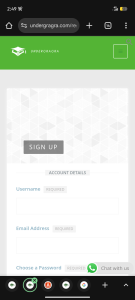
Step 2:
You’ll be directed to a registration page.
Fill in your details such as your name and email address.
Step 3:
Click on Register.
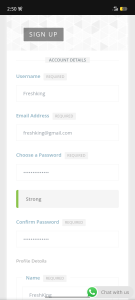
After registration, you’ll be prompted to check your email for an activation link.
Instead of waiting for the email, click the WhatsApp icon on the screen and message Undergragra directly.
📌 Important:
Ensure you save the WhatsApp contact to receive timely exam and school updates.
Your profile will be activated from the backend, after which you’ll be able to log in successfully.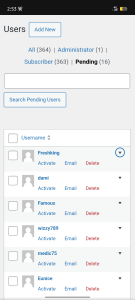
If you check the screenshots sent , I registered a new user called “Freshking” , as soon as I activate it, Mr Freshking gets full access.
How To Log In
Visit 👉 https://undergragra.com/login/
Enter the username and password you created during registration.
This will take you to your profile, where you can explore the site and access all available features.
How To Access CBT Quizzes
-
Go to the homepage
-
Locate Interesting Quizzes
-
Click on it and start practicing
How To Access PDFs
-
Navigate to Premium Library or Gragra Library
-
Browse and access available PDF materials
For Students Who Registered While Taking a Quiz
If you were redirected to the homepage after registration:
-
Go back to the homepage
-
Click on Interesting Quizzes
-
Select the quiz and continue